
Sticking with an old Angular version might feel safe — your app runs, users are logging in, features are stable. But beneath the surface, the risks of not updating are piling up. Outdated Angular versions increase your exposure to security breaches, drive up maintenance costs, and make it harder to attract and retain developers.
In this article, we’ll walk you through the 5 key reasons why skipping Angular updates can cost you more than you think. From security vulnerabilities and hidden technical debt to poor performance and developer churn, each one is a business risk, not just a technical detail.
If Angular powers the frontend of your SaaS or product application, and you’re more than two versions behind, this read is for you. You’ll find real-world examples, data-backed insights, and a clear business case for staying up to date, before it’s too late.
1. Security Risks: Your Users’ Trust Is on the Line
Security is a public promise — one that users expect you to uphold every time they log in, share their data, or interact with your product. And yet, many organizations continue running their Angular applications on outdated versions that are no longer receiving security patches or critical updates. This isn’t just a technical oversight; it’s a growing liability with serious financial, legal, and reputational consequences.
Angular, like most modern frameworks, follows a clearly defined support cycle. Only the two most recent major versions of Angular are officially supported by the Angular team. This means that once a new major version is released, support for the third-oldest version is dropped — including vital security updates. So if Angular 20 is the current release, only versions 19 and 20 are receiving security patches and critical fixes. Any version below that is:
- No longer monitored for new threats,
- No longer patched for discovered vulnerabilities,
- Increasingly incompatible with modern security best practices.
If you’re on Angular 13 or earlier, you’re not just unsupported—you’re exposed.
The business risk here is significant. As more versions are released and your project remains stagnant, the number of unpatched vulnerabilities in your codebase increases. And as these vulnerabilities accumulate, they create more opportunities for malicious actors to exploit your system.
These aren’t just hypothetical risks. Cybersecurity data shows a clear and alarming trend: According to IBM’s annual Cost of a Data Breach Report, the number of security incidents globally increased by 33% from 2020 to 2021 — and the numbers have continued rising. Many of these attacks target frontend weaknesses, including outdated JavaScript frameworks and insecure packages, which are often overlooked in favor of backend security. These frameworks often lack the latest:
- XSS (Cross-Site Scripting) protection mechanisms,
- Dependency audits,
- Secure-by-default configurations.
The consequences of such breaches are multifaceted and severe. One of the most immediate is downtime — when your application is rendered inoperable due to an attack, emergency patching, or a cascading failure caused by a vulnerability. Downtime affects everything: user satisfaction, team productivity, and revenue. And while it might sound trivial to lose a few minutes of uptime, the cost quickly adds up. According to research from Datto and other IT disaster recovery sources, just 60 seconds of downtime can cost a small to midsize business between $427 and $9,000. For larger enterprises or businesses handling sensitive transactions, that number can reach tens of thousands per minute.
However, downtime is just the tip of the iceberg. The real damage comes when a data breach occurs. Sensitive user data — names, emails, credentials, billing details — can be exposed when outdated systems fail to hold up against modern attack vectors. The fallout from such an incident is not only technical and operational but deeply personal. Customers expect you to protect their information. A breach doesn’t just cost money; it shatters trust. And once that trust is broken, it’s incredibly hard to rebuild.
Data breaches don’t just hit your IT budget, they hit your brand. According to Ponemon Institute and IBM:
- The average cost of a data breach in 2023 was $4.45 million globally.
- In industries like healthcare and finance, that figure can reach $10 million+ per incident.
- But the loss of customer trust is even harder to recover.
But even for SaaS companies, where data might seem less critical, the reputational impact can be devastating. Trust is a currency in the digital world. If your users believe their data isn’t safe with you, they will simply leave. And they likely won’t return.
In addition to user attrition, outdated software introduces legal exposure. If you’re collecting or storing personal user data and fail to update to secure, supported versions of Angular, you may be considered non-compliant with international data protection regulations. Frameworks like the General Data Protection Regulation (GDPR) in Europe, HIPAA in healthcare, and PCI DSS in the financial sector all require organizations to take “appropriate technical and organizational measures” to ensure data security.
Running software that is no longer supported — and failing to mitigate known vulnerabilities — can be seen as a breach of this obligation. In a worst-case scenario, you may be fined or held legally liable for failing to provide a secure platform.
The perception of security, too, has evolved. Users today are more informed, more cautious, and more willing to abandon a product at the first sign of negligence. They understand that modern applications must be fast, reliable, and above all, secure by design.
Angular has made major strides in security features over recent versions, including stricter sanitization of dynamic content, enhanced support for Content Security Policy (CSP), and improvements in how forms and components manage data. These aren’t cosmetic upgrades — they are architectural shifts designed to close known security loopholes and make exploitation significantly harder. By remaining on an older Angular version, you are missing out on all of these protections.
And here lies the paradox: companies that delay upgrades often do so to avoid downtime, reduce risk, or minimize short-term costs. But this delay introduces much greater long-term risks, especially in the realm of security. As one of our developers noted in a recent House of Angular webinar, “Security incidents resulting from downtime can erode customer trust. Customers expect their data to be handled securely, and a breach can lead to lost business and damaged relationships.”
So, if you’re still running Angular 11, 12, 13 — or anything below the last two major releases — you’re running a silent risk that grows each day. It’s not just about bugs or broken builds. It’s about trust, safety, and sustainability. And when it comes to user trust, there’s rarely a second chance once you lose it.
2. Technical Debt: A Hidden Cost That Grows Over Time
Technical debt is the silent killer of developer productivity. You don’t notice it at first, but each skipped Angular version adds friction, increases risk, and slows down your entire engineering process. Angular releases a major version every six months, and only the last two versions are officially supported. This aggressive schedule is designed to keep up with the pace of innovation in web standards, browsers, and tooling—but it also means the clock starts ticking the moment you fall behind.
If you skip a version or two, upgrading later becomes significantly harder. The problems aren’t limited to a few outdated APIs, they span deep changes in compiler behavior, rendering engines (like the Ivy migration), stricter TypeScript constraints, template syntax adjustments, and updated project configuration files. A small upgrade becomes a large-scale refactor, often requiring careful planning, full regression testing, and multiple sprints to complete.
Related: How to Plan an Angular Upgrade: Steps, Risks, and Best Practices
In the meantime, your development velocity drops. Teams waste hours debugging compatibility issues, maintaining brittle workarounds, and trying to build new features on top of unstable foundations. Adding new tools becomes riskier, as newer libraries drop support for older Angular versions.
Let’s break down the cost of falling behind:
- More upgrade complexity: Each skipped version introduces breaking changes you’ll eventually need to deal with—all at once.
- Legacy code overhead: Maintaining compatibility with outdated syntax and patterns adds mental load and slows onboarding.
- Tooling and plugin issues: Modern Angular tools like the CLI, testing frameworks, or IDE extensions may stop working or behave inconsistently.
- Reduced developer experience: Teams lose out on better error messages, hot reload support, simplified API surfaces, and productivity improvements.
And then there’s the business side of technical debt. As your architecture becomes more outdated, so do your user experiences. You risk falling behind competitors who ship faster, load faster, and adapt faster.
Consider the Vodafone case study: by improving Largest Contentful Paint (LCP) by 31%, they saw an 8% boost in total sales. That kind of performance lift often comes from framework-level upgrades, optimizations in the compiler, and features like differential loading or efficient hydration, all introduced in recent Angular versions. Delaying upgrades isn’t just a tech issue, it directly affects revenue.
Research backs this up. Google data shows that:
- A 1–3 second page load delay increases bounce probability by 32%.
- At 5 seconds, bounce risk doubles compared to 1-second loads.
- Conversion rates drop by an average of 4.42% for every extra second of load time.
In other words, every upgrade you skip makes it harder to deliver the performance users expect, and those expectations are rising fast. Features like fine-grained lazy loading, smarter hydration, zoneless change detection experiments, and signal-based reactivity (introduced in Angular 16+) can drastically improve perceived performance and UX—but only if you stay current.
? If you want to learn how changes in Angular 14-20 can improve efficiency, UX, DX, and app performance, download our free Ultimate Guide to Angular Evolution.
On top of that, waiting too long forces you into a corner. When your version is no longer supported, you can’t delay any longer. The upgrade becomes mandatory, but now you’re facing weeks of QA, API changes, tooling rewrites, and stakeholder pressure. By then, you’re not just paying down technical debt, you’re rebuilding your entire foundation under fire.
And it doesn’t stop at your codebase. Legacy projects become harder to staff. Developers don’t want to work on outdated systems. Hiring becomes harder. Ramp-up time grows. Documentation is stale. Third-party library maintainers drop support for your version. Suddenly, you’re not just behind—you’re alone.
You either pay down technical debt regularly through small, controlled upgrades or pay everything at once, with compound interest, reduced velocity, and high stress. The second path is always more expensive.
In the fast-moving world of front-end development, staying current isn’t about chasing trends. It’s about avoiding collapse under the weight of your own architecture. Angular makes upgrading relatively painless—if you do it consistently. But if you let yourself fall behind, technical debt will grow quietly until it takes over everything else.
Falling behind on Angular upgrades? Don’t wait for technical debt to take the wheel. How to Plan an Angular Upgrade: Steps, Risks, and Best Practices shows you how to regain control.
3. You’ll Struggle to Attract and Retain Developers
Modern developers aren’t just looking for good salaries or office perks—they care deeply about the tools they work with every day. For experienced engineers, working with an outdated tech stack is a major red flag. It signals more than technical debt: it often points to deeper organizational issues, such as a lack of investment in innovation, poor engineering leadership, or rigid legacy processes.
The 2023 Stack Overflow Developer Survey, which gathered insights from over 90,000 developers globally, clearly shows that working with modern technologies is one of the top reasons developers accept or reject jobs. In fact, when asked what matters most in a new job, many developers prioritized learning opportunities and access to current tools over compensation or remote work flexibility. They want to build the future, not babysit the past.
That means if your Angular codebase is stuck on version 11 or 12, while the current stable version is 20, you’re not just behind on features, you’re actively pushing talent away. Most skilled frontend developers follow framework trends closely. They don’t want to struggle with deprecated APIs, outdated testing setups, or unsupported libraries. Working in such an environment can feel like fighting the framework rather than building the product.
This talent gap has direct business consequences. Companies relying on older versions of Angular often need to offer significantly higher salaries to attract engineers who are willing to take on the frustration of maintaining legacy code. Those developers know the cost of working in a brittle, outdated system—and they expect to be compensated for it. This drives up your hiring costs and narrows your candidate pool.
But hiring is only half the battle. Once onboard, developers face steep learning curves, especially if your project relies on undocumented workarounds or uses outdated tooling. Without proper upgrade paths, code becomes harder to reason about. It lacks clear patterns, suffers from performance inconsistencies, and fails to reflect the standards today’s engineers are trained in. New team members take longer to become productive, and they often leave sooner.
Even the most dedicated developers eventually become discouraged in legacy environments. They can’t try new architecture patterns like standalone components or signals. They can’t benefit from Angular’s latest ergonomic improvements in debugging, testing, or dev tooling. Their skills stagnate. Their curiosity fades. Eventually, morale declines, and productivity follows.
? How does each Angular 14-20 version impact your business?
Find out in our ebook, which includes a clear tech-to-business summary.
Stagnation spreads silently. Innovation slows down—not because your team lacks ideas, but because your stack lacks the infrastructure to support fast iteration. The inability to integrate with modern libraries, adopt SSR improvements, or use stricter typing with TypeScript 5+ means that even basic feature development becomes slower and riskier. Time that could be spent on building better UX or experimenting with performance enhancements gets wasted on avoiding breakages or deciphering arcane parts of the codebase.
Meanwhile, your competitors are moving fast. They’ve upgraded. They benefit from improvements like Angular’s faster build pipeline, better CLI defaults, native support for environment variables, and more predictable dependency injection. Their developers debug faster, deploy more confidently, and experiment with the future of frontend tooling—like zoneless reactivity or hydration-aware SSR. They don’t just ship features faster—they retain their top engineers, who are excited to be part of a modern and evolving ecosystem.
Modern Angular versions bring real improvements to Developer Experience (DX), including:
- Better CLI defaults and faster scaffolding
- Improved TypeScript support and stricter typings
- Easier debugging with clearer error messaging
- Support for standalone components and signals
- Faster builds through incremental compilation
These changes don’t just make development more pleasant—they also reduce bugs, increase testing efficiency, and improve codebase longevity.
By staying on an older version of Angular, you’re missing out on all of this. You’re asking developers to accept higher friction, more bugs, slower feedback cycles, and fewer learning opportunities. That’s a hard sell, especially in a competitive market.
And make no mistake, developer turnover is expensive. When an engineer leaves, you don’t just lose skills. You lose product knowledge, architectural context, and team momentum. It can take months for a new hire to catch up. Meanwhile, team morale takes another hit. The cycle continues.
Why this hurts your organization in the long run:
- Higher salaries just to compensate for a painful tech stack
- Slower onboarding and lower retention rates
- Missed innovation opportunities due to poor infrastructure
- Declining morale and motivation in your dev team
So, if your Angular version is unattractive, your engineering brand is unattractive. And if your engineering brand suffers, you either overpay for talent or you miss out entirely. Both scenarios cost you real money, delay your roadmap, and slowly erode your ability to compete.
4. User Experience Suffers — And So Does Revenue
User expectations are at an all-time high. Whether your app serves internal teams or global consumers, users subconsciously compare your product to the fastest, smoothest experiences online—those delivered by Amazon, Meta, or Google.
And speed matters more than you think. Studies show a 1-second delay in page load can reduce conversions by up to 20%. If your site takes 3 seconds to load, the chance of a user abandoning it increases by 32%. At 5 seconds, that risk jumps to over 90%.
Users, especially on mobile, are impatient. A behavioral study commissioned by Ericsson revealed that slow mobile load times trigger stress levels similar to watching a horror movie. That stress drives users away, damages your brand, and reduces your chances of a return visit.
Falling Behind on Angular Means Falling Behind on UX
Outdated Angular versions lack key performance enhancements. Recent upgrades, from Angular 15 to 18, introduced:
- Hydration improvements, especially for Angular SSR, allowing faster transition from server-rendered content to fully interactive pages
- Smarter lazy loading and preloading, reducing the time it takes to display usable content
- Improved bundling and tree-shaking, decreasing JavaScript size and parsing time
Replacements for deprecated browser APIs, ensuring better cross-device and cross-browser performance
? If you want to learn more features in Angular 14-20 that improve efficiency, UX, DX, and app performance, download our free Ultimate Guide to Angular Evolution.
These updates are difficult or impossible to backport. If you’re running Angular 13 or earlier, your app will load more slowly, feel heavier, and behave inconsistently across modern devices.
Your Team Can’t Fix What They Can’t See
Modern Angular versions also enhance developer experience, offering better tooling for detecting and solving performance issues. These include improved:
- Angular CLI profiling tools
- Real-time performance monitoring
- Stronger typing and error messaging
Without these tools, performance regressions slip through unnoticed. Your team may spend weeks debugging issues that could’ve been solved in hours with the right tools.
The result? Increased QA costs, longer release cycles, and ultimately, degraded user satisfaction.
UX Is Directly Tied to Revenue
Poor user experience has a measurable financial impact. According to a Vodafone case study, a 31% improvement in Largest Contentful Paint (LCP) led to an 8% increase in total sales. Fast, smooth apps don’t just make users happy, they drive revenue.
Conversely, slow or buggy applications increase churn, lower session times, and damage brand trust. Even loyal users begin to disengage. Once you’ve lost them, winning them back costs more than keeping them in the first place.
You Can’t Compete Without a Modern UX Stack
Modern UX also involves responsiveness, accessibility, and support for evolving standards like progressive hydration or partial pre-rendering. These aren’t available in older Angular versions.
If you’re stuck on Angular 12 or 13, your app was built before many of today’s best practices were even possible. That means you’re offering users an experience that feels outdated, because it is.
Outdated Angular versions prevent you from delivering the kind of UX users expect and demand. Every performance regression, visual bug, or frustrating load time chips away at user trust and revenue.
Keeping up with Angular updates isn’t just about modern code. It’s about maintaining a modern, competitive product.
5. Product Stagnation: Innovation Grinds to a Halt
When your Angular version is outdated, it’s not just about slower builds or longer deployment times. The entire product development lifecycle suffers. Outdated dependencies and tooling create bottlenecks that affect your team’s ability to innovate and respond swiftly to market demands.
Adding new features becomes a frustrating process. Because older versions often rely on deprecated libraries or APIs, integrating fresh functionality requires extensive workarounds or refactoring. What should be straightforward often turns into a lengthy task, increasing development time and cost.
Bugs Become Harder to Fix Without Upstream Support
Angular’s official support covers only the last two major versions, which means older versions receive little to no security patches, bug fixes, or performance improvements. When your app runs on unsupported versions, bugs and vulnerabilities pile up without easy fixes.
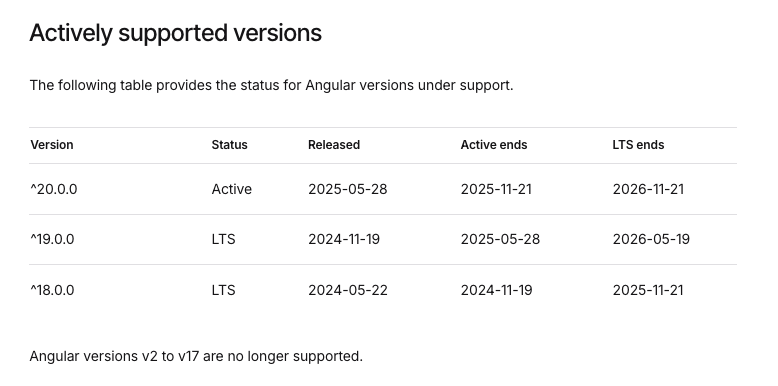
Image resource: https://angular.dev/reference/releases
This forces your development team to:
- Hunt for community patches or roll their own fixes
- Work around deprecated APIs that no longer function as expected
- Risk of introducing new issues when trying to patch existing ones
Without proper upstream support, troubleshooting becomes a complex, time-consuming endeavor that diverts resources from building new features.
Your Team Spends More Time Patching, Less Time Building
As technical debt grows, your developers find themselves caught in a cycle of maintenance and firefighting. Instead of innovating or improving the product, they spend disproportionate time:
- Resolving legacy issues
- Ensuring compatibility with old dependencies
- Updating workarounds when dependencies break
This constant patching wears down morale and slows overall progress. Developers often feel frustrated and blocked, unable to deliver on their ideas or improve the user experience.
When Innovation Stops, So Does Growth
A stagnant product quickly loses its competitive edge. Users notice when features become outdated or when the app feels clunky. Investors grow wary if your product roadmap stalls, and the market moves on.
Without ongoing innovation, user engagement declines. The app no longer attracts new users, and existing users begin to churn. Over time, this impacts business growth and profitability.
Angular Updates Are Critical for Staying Competitive
Keeping Angular up to date isn’t just about following Google’s release schedule. It’s a strategic move to ensure your product remains:
- Fast and performant
- Secure against emerging vulnerabilities
- Compatible with modern tools and best practices
In today’s fast-moving digital environment, falling behind on updates means risking your product’s future.
Staying Updated Is a Strategic Advantage
Skipping Angular updates isn’t just risky, it’s a threat to your business survival. Security flaws, tech debt, poor performance, developer loss, and product stagnation aren’t problems you want to face.
User trust depends on security, technical debt inflates costs and risks, slow apps lose customers, developers won’t stay in outdated environments, and innovation dies without updates.
If your app is behind more than two Angular versions, the clock is ticking. Don’t wait, read our next article to start planning your upgrade today.