
You know the upgrade needs to happen, but the question is how much time and effort it will take.
For teams building and scaling SaaS products, it depends on more than just the Angular version. Your architecture, dependencies, custom components, and team’s daily work all play a role.
In our previous article How to Plan an Angular Upgrade: Steps, Risks, and Best Practices, we outlined how to approach the upgrade from a planning perspective – what to audit, when to start, and how to reduce risk.
Here, we’ll take it further and look at what affects the actual duration of the Angular upgrade process. This article is designed to help estimate Angular upgrade effort more clearly, based on real-world factors.
What Affects Angular Upgrade Time?
“How long will the upgrade take?” is one of the questions we hear most often – and for good reason.
The truth is that the time required to upgrade Angular depends on many factors, some of which can multiply the overall effort.
Key Factors That Influence Angular Upgrade Duration
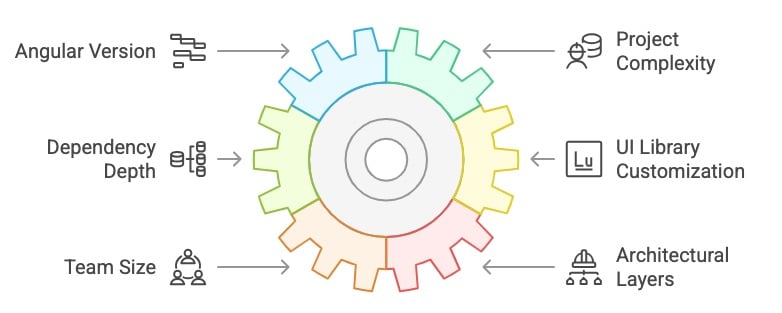
- The Angular version you’re starting from — the older it is, the more changes you’ll need to account for along the way.
- Project complexity — more feature modules, extensive routing, or heavy use of state management libraries like NgRx can all extend the process.
- Dependency depth — the more third-party libraries you use (and the more deeply integrated they are), the more time you’ll spend aligning them with the upgrade.
- Customization of UI libraries — UI libraries like Angular Material tend to introduce many breaking changes, and sometimes even the baseline design system can change across different versions, which can require a lot of extra effort. For example, migrating to MDC-based components (introduced in v15) often requires reworking multiple layers of styling and logic.
- The number of frontend developers available to consistently focus on the upgrade—a small or overstretched team might need significantly more time. On the other hand, the more ongoing work happens in the background, the more granular the process needs to become, and more careful step-by-step planning is required.
- Additional architectural layers, like server-side rendering (SSR) or micro frontends, can introduce extra technical constraints and complexity.
For example, a project built on Angular 11, with heavy use of Angular Material and dozens of extended custom components, minimal test coverage, and just two developers, might require several months to upgrade safely. On the other hand, a newer project with solid test coverage and little reliance on UI frameworks might be upgraded within a few weeks.
The best part is that future upgrades will be much easier after completing one significant upgrade. Think of it like taking care of a car: the more up-to-date you are with maintenance, the fewer surprises you’ll encounter down the road.
Estimate Your Angular Upgrade Effort
There’s no one-size-fits-all timeline. That’s why we’ve created a short diagnostic survey for tech leads and CTOs to help identify what may slow down or speed up your upgrade process.
What the survey covers: Angular version, app complexity, team capacity, and architecture — the key factors that influence upgrade effort.
What you get: Tailored recommendations based on your specific situation. This is not a fixed estimate but a strategic assessment of the required work.
We also evaluate feature readiness: Signals, standalone components, and the updated control flow syntax. Since not every team adopts these features immediately, the assessment helps you plan realistically by identifying which changes may impact your timeline.

How to Combine an Angular Upgrade with Ongoing Feature Delivery
One of the biggest concerns for SaaS teams is handling an Angular upgrade without halting product development. Fortunately, in most cases, you don’t have to stop delivering features to update Angular. The key lies in strategic planning and mindful team coordination.
Key takeaways:
- Start during a quieter sprint or right after a release.
- Assign 1–2 devs to handle the upgrade in focused chunks.
- Dedicate ~20% of sprint time to technical work like testing or cleanup.
- Look for natural upgrade opportunities during bug fixes or refactors.
- Strong test coverage is essential for safe background upgrades.
- For complex upgrades, working with experienced Angular experts can reduce risk and help your team stay focused on product delivery.
The best time to start the upgrade is during a calmer phase of your project, such as right after a major release or during a slower sprint. When your roadmap allows, spreading the more complex upgrade tasks across multiple sprints can help maintain development velocity without sacrificing stability.
A good approach is to dedicate one or two developers to the upgrade while the rest of the team continues to ship features. It’s also worth considering allocating a small portion of your sprint capacity, around 20%, to technical work like refactoring, testing, or experimenting with new Angular features. This lets your team make progress on both fronts without overloading key contributors.
In some cases, it may make sense to plan the upgrade before building a new feature. This way, you can use modern APIs immediately and avoid needing to rewrite the feature soon after. However, even if that’s not an option, new Angular features can be adopted gradually, as most do not require an immediate migration effort.
? Extra resource
Download the free checklist of the 15 most common mistakes made during an upgrade, along with practical tips on how to prevent them.
It’s also beneficial to look for natural opportunities to modernize your code. If you’re already working on a part of the application due to a task or bug fix, aligning that effort with adopting new features could be worthwhile. These opportunistic migrations help reduce technical debt with minimal team workflow disruption.
Don’t forget the importance of communication. A well-informed team understands why changes are happening, what might change, and where extra caution is needed. Keeping everyone updated on the progress of the upgrade, especially when it runs parallel to regular work, helps avoid misunderstandings and misalignments.
Lastly, ensure that testing is a priority. Continuous testing, high test coverage, and automation of critical paths are essential. With the proper guardrails in place, upgrade work can occur in the background without the fear of breaking previously working features.
In some cases, bringing in experienced Angular specialists to handle the upgrade may be safer and more efficient. Having dedicated experts care for the migration can reduce internal distractions and help your team focus on product delivery.
We specialize in complex Angular upgrades at House of Angular and have helped product teams modernize with minimal disruption.
? Want to see a real-life example of a modular SaaS platform upgrade? Explore our case study.
Ready to Upgrade?
Angular evolves quickly, and while upgrading may seem daunting, a well-executed upgrade can lead to significant, measurable benefits. It enhances your code and your team’s efficiency, confidence, and overall development experience.
Upgrading isn’t just about staying current. It’s a strategic move to build a more secure, high-performing, and future-ready product, without losing development momentum.
Upgrade Confidently — Or Estimate First
If you’re planning an upgrade but unsure where to start or how long it might take, don’t guess. Use data.
Take our short diagnostic survey to assess your setup and get a tailored view of your upgrade effort. The better you plan now, the easier future upgrades will be.